
Building an E-commerce Focused RAG System: Part 1 - Data Pipeline Strategy

Most RAG tutorials teach you how to build chatbots for documentation or blog content. But what happens when your data isn’t a collection of markdown files? What if you’re dealing with thousands of products, each with images, pricing, inventory status, and complex relationships? That’s where things get interesting.
In this series, I’ll walk you through building a RAG system specifically designed for e-commerce. Not the usual blog post search, but a real product recommendation system that can handle a Shopify catalog at scale.
What We’ll Build
Over this series, we’ll cover:
Part 1: Data Pipeline Strategy (this article)
Part 2: Embedding Strategy for E-commerce Products
Part 3: Retrieval and Query Optimization
Part 4: Putting It All Together
This first article focuses on the data pipeline architecture. I’ll explain the strategy behind my design choices, why certain patterns matter for e-commerce, and how data flows through the system. No code yet, just the architectural decisions that will make or break your RAG system.
My Journey with LLMs
I have been using LLMs for a while now. I first used them as a developer on several phases of the SDLC. Then, I used them to build my first SaaS, a code reviewer which helped me understand more advanced prompt techniques and concepts.
But prompting is limited when you want to build more complex AI tools. You need Agentic AI. LLMs are limited to the data they were trained on, and they need guidance on how to find more data. That’s where RAG comes in.
Quick RAG Refresher
Retrieval-Augmented Generation (RAG) is the process of optimizing the output of a large language model, so it references an authoritative knowledge base outside of its training data sources before generating a response.
Think about a chatbot inside your organization that must answer questions for your team. The responses must match your organization’s rules and use the right data. But since all organizations are different, how can the LLM know what applies to yours?
With RAG, your chatbot requests the right documents from your database to give an up to date and focused answer. The system has two main parts: the embeddings (how you store your data as vectors) and the data retrieval (how you find the right data when needed).
The Use Case
So I decided to explore a use case that has often left me wondering: how would I build a chatbot to explore a marketplace product database and give product suggestions based on a text description, an image, or something like that?
Why E-commerce is Different
Here’s the thing. Most RAG content focuses on the same use case: searching through documentation or blog posts. But we’re not always dealing with simple text documents. The use cases of Agentic AI are huge and only limited by our imaginations.
E-commerce data is fundamentally different:
Structured metadata matters. Products have prices, SKUs, categories, brands, and inventory levels. These aren’t just text to embed, they’re filters and constraints that affect recommendations.
Visual data is essential. A product description might say “blue dress” but the image shows the actual shade, style, and fit. Text-only embeddings miss half the picture.
Data changes constantly. Prices fluctuate, inventory depletes, products get discontinued. Your embeddings need to stay in sync without manual intervention.
Scale is real. A decent sized e-commerce site has thousands of products. A large marketplace has millions. Your architecture needs to handle this from day one.
You don’t treat products the same way as blog articles. Each domain needs its own strategy and the foundation of any RAG system is the embedding phase. How you embed your data determines everything that comes after. At scale, with thousands of products, you need to design your system to be resilient and performant.
That’s what this article is about.
Design Goals
Before jumping into architecture, I needed to define what I’m optimizing for:
Scalability. The system must handle thousands of products without breaking. When a store adds 500 new products, the pipeline should process them smoothly.
Resilience. If one component fails, the whole system shouldn’t crash. I need durability and the ability to replay events if something goes wrong.
Flexibility. In Part 2, I’ll explore different embedding strategies. I need to re-embed my entire catalog without re-scraping Shopify every time. The data pipeline should be decoupled from the embedding logic.
Separation of concerns. Each component should do one thing well. This makes debugging easier and lets me swap out parts without rewriting everything.
Observability. I need to know where data is at any moment. Did the Shopify import finish? Are embeddings up to date? Where did that product get stuck?
These goals drove every architectural decision that follows.
The Architecture Strategy
In my proof of concept, the flow is straightforward: give the system a Shopify shop URL, and it will scrape the products and make them searchable through embeddings.
But how do you actually build this? The process has three distinct phases:
Ingestion: Accept import requests and fetch product catalogs
Storage: Store products as the source of truth
Embedding: Transform products into searchable vectors
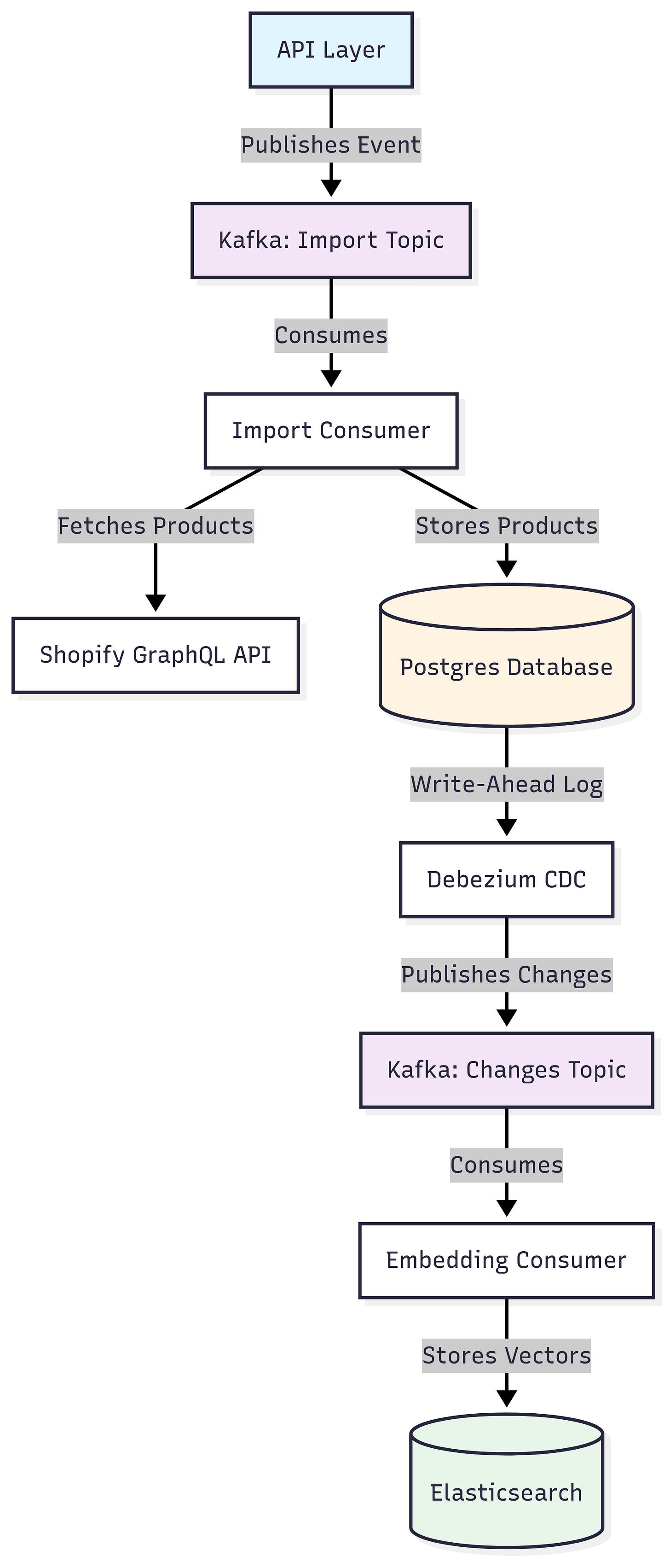
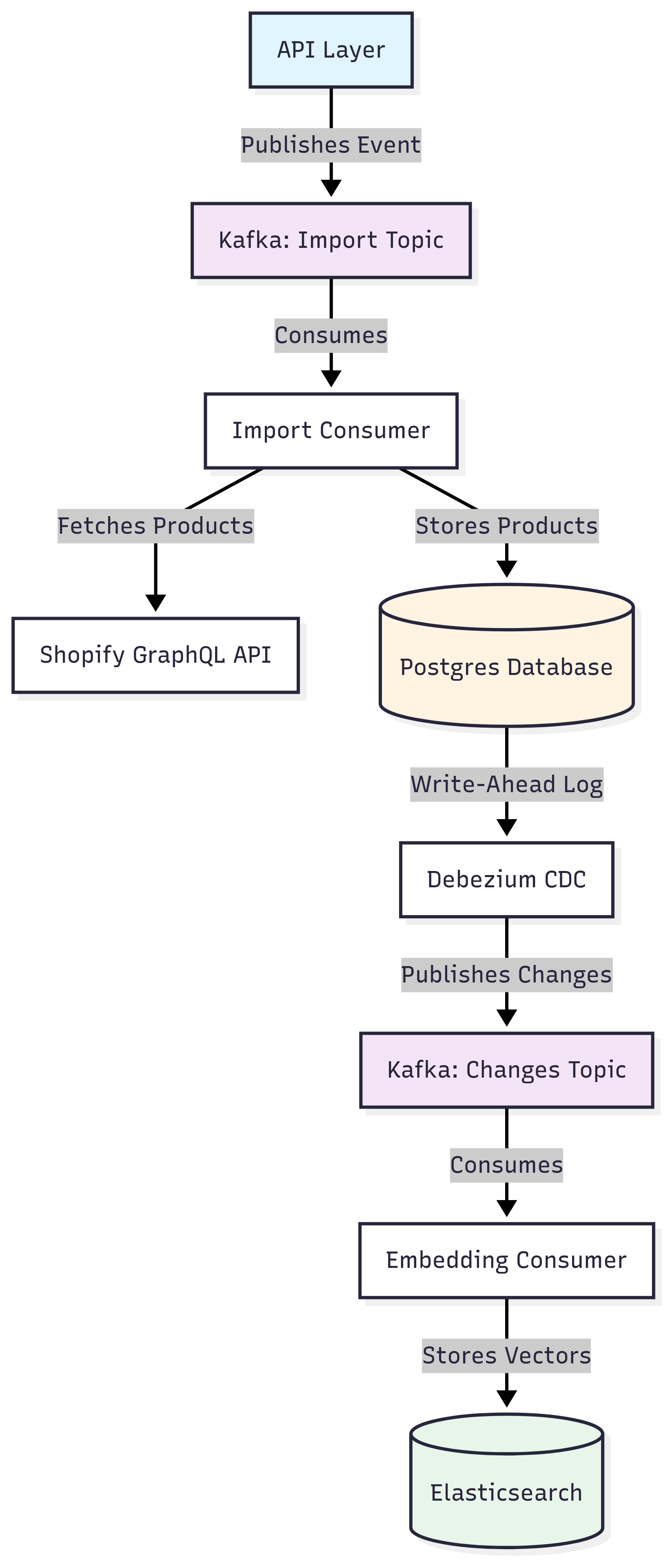
The key insight is that these phases should be decoupled. Changes in one shouldn’t require changes in the others.
Phase 1: Ingestion Strategy
The first decision was about the import API. Should it be synchronous or asynchronous?
A synchronous API would be simpler. Send a POST request with a Shopify URL, wait for the import to complete, return a response. Done.
But think about what happens at scale. A Shopify store might have 5,000 products. Fetching them via the GraphQL API could take minutes. Your HTTP request times out. The user has no idea if it worked. You can’t handle multiple import requests at once.
This is why I went async from the start. The architecture looks like this:
API Layer. Exposes a POST endpoint that accepts Shopify store URLs. It validates the request and immediately returns an acknowledgment. No waiting.
Event Broker. The API publishes an event to Kafka with the import job details. Kafka gives us durability (events don’t disappear if something crashes) and the ability to have multiple consumers processing different jobs.
Import Consumer. A separate service consumes events from Kafka and does the actual work of fetching products from Shopify’s GraphQL API.
Why Kafka specifically? I considered RabbitMQ, but I haven’t looked at Kafka for a while so it’s just a good opportunity.
The async pattern means I can accept multiple import requests, queue them up, and process them as resources allow. It also means better error handling. If the Shopify API rate limits me, the job stays in the queue and retries later.
Phase 2: Storage Strategy
Once I fetch products from Shopify, where do they go? The obvious answer might be: straight to the vector database. Embed them and store them in Elasticsearch.
But that would be a mistake. Here’s why.
You need a source of truth. Vector databases are great for similarity search, but they’re not designed for transactional data. What if you need to query “show me all products under $50 in the electronics category”? What if you need to audit which version of a product was embedded? What if your embedding model changes and you need to re-embed everything?
This is why I use Postgres as the source of truth for product data. When the import consumer fetches products from Shopify, it stores them in a relational database with a proper schema.
Benefits of this approach:
Separation of concerns. Product data storage is separate from search. I can query, update, and manage products using standard SQL tools.
Re-embedding capability. If I decide to change my embedding strategy (which I will in Part 2), I can re-process all products from Postgres without hitting Shopify’s API again. This is huge for experimentation.
Relational integrity. Products have relationships (variants, collections, related items). SQL databases handle this naturally.
Audit trail. I can track when products were imported, updated, or changed. This helps with debugging.
Some might argue this adds complexity. Why not just use Elasticsearch with good backups? Because Elasticsearch is a search engine, not a database. It’s optimized for different things. Using the right tool for the right job makes the system more maintainable in the long run.
Phase 3: The Embedding Pipeline Challenge
Now here’s where it gets interesting. I have products flowing from Shopify into Postgres. But they also need to get into Elasticsearch as vector embeddings. How do I connect these two phases?
The naive approach would be: after inserting a product into Postgres, immediately call the embedding service, then store the result in Elasticsearch. All in the same import consumer.
This creates tight coupling. The import consumer now needs to know about embedding logic, embedding models, and Elasticsearch. If embedding fails, does the whole import fail? If I want to change how embedding works, I need to modify the import consumer.
I needed a better pattern. Something that would automatically propagate changes from Postgres to the embedding pipeline without manual triggers. Something that would decouple these concerns completely.
That’s where Change Data Capture comes in.
Change Data Capture: The Key Insight
Change Data Capture (CDC) is a pattern where you configure your database to log every change made to specific tables. Other systems can then listen to these change logs and react accordingly.
Here’s how it works in practice:
Postgres logs changes. When a product is inserted or updated in Postgres, the database writes this change to its write-ahead log (WAL).
Debezium reads the log. Debezium is a CDC tool that connects to Postgres, reads the WAL, and streams changes to Kafka as events.
Embedding consumer reacts. A separate embedding service consumes these change events from Kafka. When it sees a new or updated product, it generates embeddings and stores them in Elasticsearch.
Why is this elegant?
Complete decoupling. The import consumer has no idea embedding exists. It just writes to Postgres and moves on. The embedding service has no idea how products got into Postgres. It just reacts to changes.
Automatic propagation. Any change to product data, from any source, automatically triggers re-embedding. If I manually update a product in Postgres, the embedding updates. No manual triggers needed.
Replay capability. Since changes flow through Kafka, I can replay them. If I deploy a new embedding model, I can reset the consumer offset and re-process all product changes.
Independent scaling. If embedding becomes a bottleneck, I can add more embedding consumers without touching the import pipeline.
My first iteration actually used a custom Golang program to read Postgres changes and publish to Kafka. It worked, but then I discovered Debezium. It handles all the complexity of CDC (offset management, schema changes, error handling) out of the box. Why reinvent the wheel?
Why Not a Simpler Architecture?
I know what you’re thinking. This seems like a lot of moving parts for what could be a simple scrape, embed, and store pipeline. Why not just fetch products and write them directly to Elasticsearch?
Here’s the thing. Simple architectures are great until they’re not.
If you go the simple route, you’re tightly coupling everything. Your scraper needs to know about embeddings. Your embeddings are tied to your scraper. When you want to change embedding strategies (and you will), you need to re-scrape everything. When products update in Shopify, you need complex logic to figure out what changed and what needs re-embedding.
The architecture I’ve described has more components, yes. But each component has a single responsibility. The import consumer only cares about fetching from Shopify. The embedding service only cares about generating vectors. Postgres only cares about storing products. Kafka only cares about moving messages.
This separation means I can:
Swap out Shopify for another e-commerce platform without touching embedding logic
Change embedding models without touching the import pipeline
Scale each component independently based on bottlenecks
Debug issues by looking at one component in isolation
Add new consumers that react to product changes (analytics, notifications, etc.) without modifying existing code
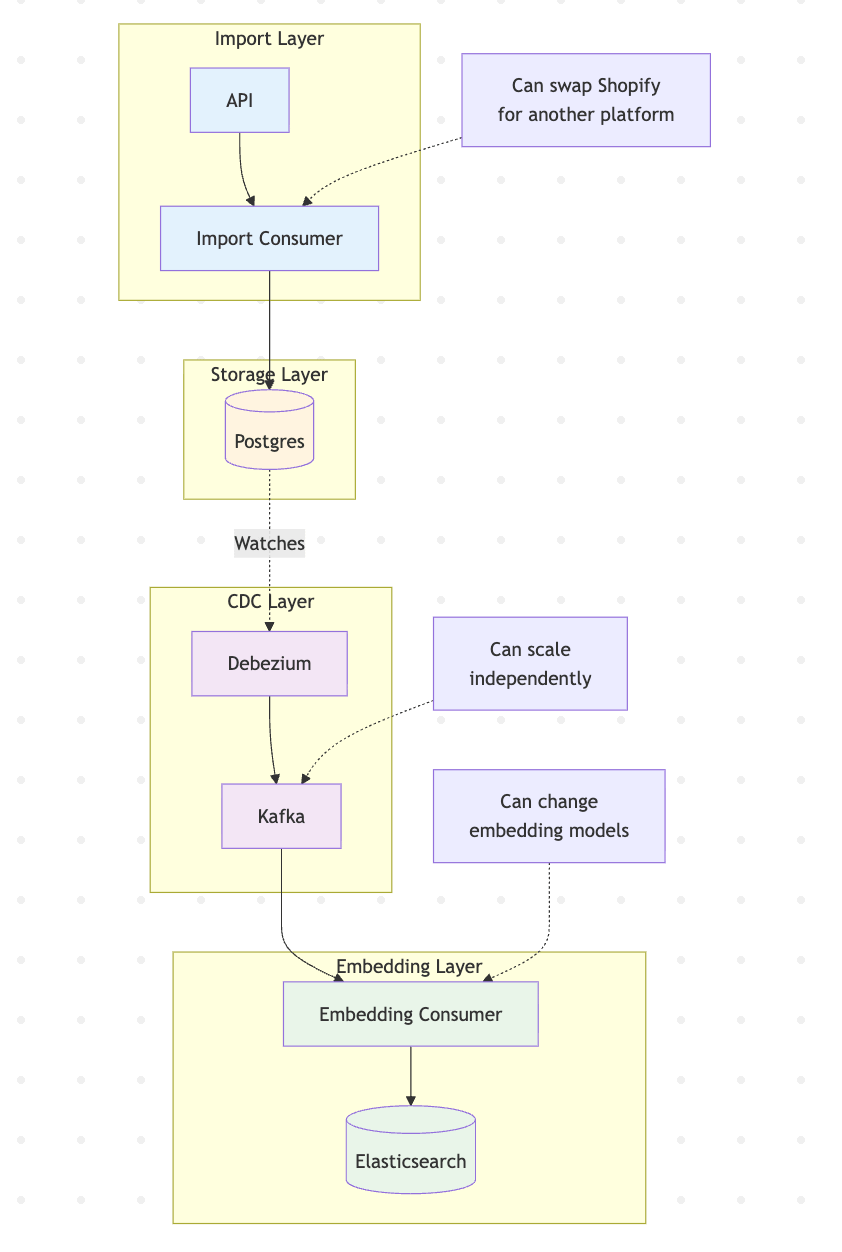
The cost is operational complexity. You need to run and monitor more services. But for a system that needs to scale and evolve, this cost is worth it.
The Complete Data Flow
Let me walk through what happens when someone imports a Shopify store:
Step 1: User sends POST request to the API with a Shopify store URL
Step 2: API validates the request and publishes an “import_requested” event to Kafka
Step 3: Import consumer picks up the event and starts fetching products from Shopify’s GraphQL API
Step 4: As products are fetched, they’re inserted into Postgres with all their metadata (title, description, price, images, etc.)
Step 5: Postgres writes these inserts to its write-ahead log
Step 6: Debezium reads the WAL and publishes “product_created” events to a different Kafka topic
Step 7: Embedding consumer picks up these events, generates vector embeddings for each product, and stores them in Elasticsearch
Step 8: The product is now searchable through vector similarity queries
If a product is updated in Shopify and re-imported, steps 4 through 8 happen automatically. The system keeps embeddings in sync without manual intervention.
The Tech Stack Decisions
Let me address why I chose each technology:
Postgres for storage. I needed a relational database with strong CDC support. Postgres has mature tooling, great performance, and works seamlessly with Debezium. I considered MongoDB, but product data has clear relationships (variants belong to products, products belong to collections) that SQL models naturally.
Elasticsearch for vectors. I looked at specialized vector databases like Pinecone and Weaviate. They’re great, but Elasticsearch offers something unique: hybrid search. I can combine vector similarity with traditional filters (price range, category, in stock). It’s also self-hosted, which matters for cost at scale. The vector plugin is mature and performant.
Kafka for events. I needed durability, replay capability, and the ability to fan out events to multiple consumers. Kafka is the industry standard for event streaming. It’s over-engineered for small projects, but for a system designed to scale, it’s the right choice.
Debezium for CDC. Rolling your own CDC is possible but painful. Debezium handles offset management, schema evolution, and error recovery. It’s battle-tested and just works.
What This Architecture Gives Us
The result is a highly scalable design that can handle real-world e-commerce requirements:
Handle multiple imports. The async pipeline can process several Shopify stores at once without blocking.
Keep embeddings in sync. Product updates automatically propagate through CDC without manual triggers.
Experiment freely. The catalog sits in Postgres, so I can re-embed with different strategies without re-scraping.
Clear separation of concerns. Each component has one job and does it well. Debugging is straightforward because I can trace data flow step by step.
Scale independently. If embedding becomes slow, I add more embedding consumers. If imports are the bottleneck, I add more import consumers. Each scales separately.
This is the foundation. A robust data pipeline that gets product data into the system and keeps it in sync. But we haven’t talked about the most crucial part yet: how to actually embed e-commerce products.
What’s Next
The pipeline is ready. Products flow from Shopify into Postgres, and changes automatically propagate to the embedding service through CDC. But now comes the real challenge.
How do you actually embed a product? Products aren’t just text. They have images that show color, style, and context. They have structured attributes like price, brand, and category. They have relationships with other products. Traditional text embedding strategies fall short.
In Part 2, we’ll dive deep into embedding strategies for e-commerce. I’ll explore different approaches, explain the tradeoffs, and show you how to handle the multimodal nature of product data. That’s where the magic happens.
The data pipeline we built today makes all of that possible. See you next week.